Fix Email Deliverability Issues: Your 2026 Guide
Email deliverability issues are usually a stack of authentication, sender reputation, engagement, list quality, and sending-pattern problems. This guide gives teams a diagnostic workflow for finding the real cause before changing copy or platforms.

You send a campaign you know is solid. The segment is right, the offer is clear, and the copy is better than last month's. Then the numbers come back flat, and support starts hearing from customers who say they never saw the email.
That's the point where people chase the wrong problem. They rewrite subject lines, cut a few words they think look spammy, or swap templates; sometimes they change platforms before proving what's broken. Meanwhile the actual issue sits a layer deeper. Authentication may be fine and the message may even be accepted by the receiving server, but the mailbox provider still doesn't trust the sender enough to put it in front of anyone.
Most deliverability problems are not one problem. They're several producing the same symptom. Low engagement looks like a content issue. A domain reputation problem looks like a technical failure. A list-quality problem hides behind perfectly normal send success.
The fix is rarely one tweak. It's a system.
Why correctly configured email still lands in spam
You can have SPF, DKIM, and DMARC set up properly and still miss the inbox.
I see this pattern constantly. A team looks at low opens, assumes the offer failed, and starts editing creative. Your ESP will happily report successful delivery while telling you nothing about whether the message landed in the inbox or in junk; those are different questions, and only one of them matters.
The biggest myth in this whole area is that spam placement comes down to spam words. Content contributes, but second-order signals decide far more cases than copy does. Mailbox providers watch complaint rates, deletion without reading, list age, sending consistency, and whether your domain behaves like a sender people want mail from. Authentication gets you a seat at the table; it doesn't seat you in the inbox.
So when one campaign underperforms, verify placement before you rewrite anything. That means checking directly rather than inferring from open rates, which are noisy enough now to mislead you in both directions. Seed list deliverability testing is the fastest way to see where mail is actually landing, and it should happen before you touch templates, cadence, or targeting.
Treat deliverability as an ongoing function with two separate jobs: prove the mail is legitimate, then prove recipients keep wanting it. Authentication failures break trust quickly, but so do complaint spikes, stale lists, and erratic sending. Look for patterns by provider and message type, because a Gmail problem is a different animal from an Outlook problem and a newsletter issue is different from a receipt issue. Better creative will not repair a domain that has spent a year training mailbox providers to expect indifference.
A diagnostic workflow that saves time
When deliverability drops, random checking wastes days. Collect signals first, then narrow until the cause is obvious enough to fix.
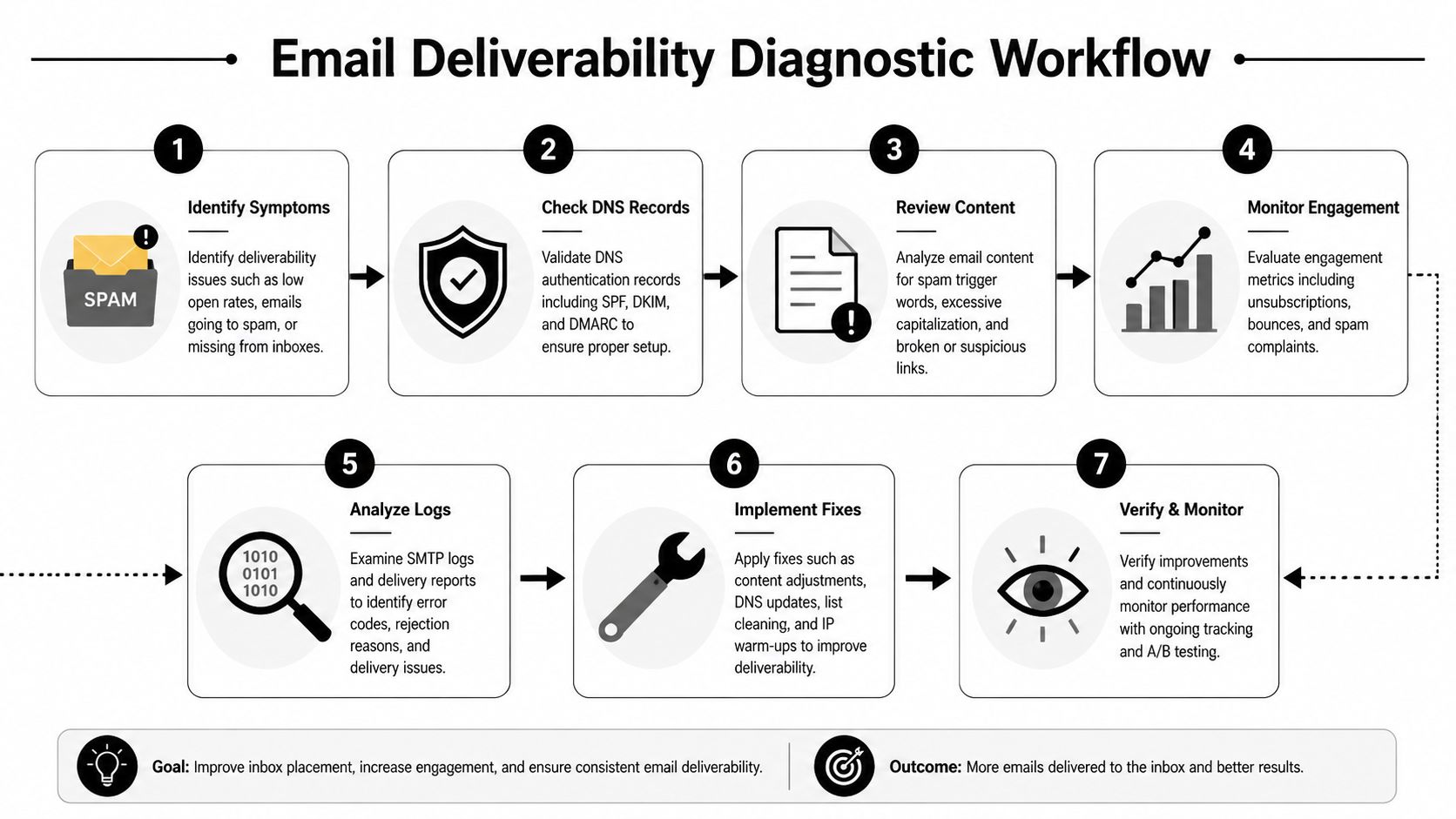
Before you touch DNS, templates, or volume, write down what you're seeing. What changed first: lower opens, higher bounce rate, more complaints, or provider-specific spam placement? Which email types are affected, promotional or onboarding or receipts or outbound? Which mailbox providers are involved? And was the drop sudden or gradual, since sudden usually points to a configuration or reputation event while gradual points to list decay?
Aggregate numbers hide everything interesting. If onboarding still lands but promos don't, that's a finding. If Gmail placement is stable while Outlook filters aggressively, that's a finding. If complaints spike only on the segment acquired from one particular form, you're nearly done.
Break the problem apart across five axes: email type (transactional, lifecycle, newsletter, promo, cold outreach), recipient domain, audience source, sending pattern, and content profile. Popup subscribers behave differently from checkout opt-ins, which behave differently from a list you imported.
If you can't say which mailbox provider, which segment, and which message type is failing, you're not diagnosing. You're guessing.
Then work in priority order, because fixing the wrong layer first is how teams burn a month.
| Check first | Why it matters | What you're looking for |
|---|---|---|
| Authentication status | Basic trust gate | Alignment issues, missing signatures, policy errors |
| Bounce and complaint signals | Fast reputation clues | Patterns tied to segments or providers |
| Sender reputation tools | Domain-level trust picture | Reputation drift, provider warnings |
| Sending behavior | Filtering trigger | Sudden volume changes, inconsistent cadence |
| Content and links | Secondary filter inputs | Broken links, mismatched branding, suspicious redirects |
One practical note. If you run several tools or mail streams, confirm which system sends which mail before you start blaming anything. Teams regularly discover the broken source wasn't their main ESP; it was a CRM add-on, a support desk, or a secondary sender nobody remembered authorizing.
Getting SPF, DKIM, and DMARC right
Authentication is the floor, not the ceiling. You need it, and you need it correct, but correct records only prove your mail has the right to speak for your domain.

People memorize the acronyms without understanding the job each performs. SPF declares which sending sources may send on behalf of your domain. DKIM attaches a signature that lets receiving servers verify the message wasn't altered in transit. DMARC tells receivers how to treat mail that fails those checks, and it gives you reporting visibility you won't get anywhere else.
That's the simple version. The operational version is that these records have to reflect reality. If your marketing platform, CRM, support desk, ecommerce system, and newsletter tool all send mail, authentication has to account for every one of them. Plenty of teams believe they're authenticated because one platform passes; another fails alignment unnoticed for months and drags the whole domain down with it. Our walkthrough on how to set up SPF, DKIM, and DMARC covers the implementation details, and the DMARC generator will produce a valid record if you're starting from nothing.
Authentication failures are boring, which is exactly why they get overlooked. A retired tool still sending from your domain. Partial setup across subdomains, where marketing mail is configured and product mail isn't. Misalignment between the visible From domain and the authenticated one, which looks fine in an inbox preview and fails underneath. Record sprawl from too many edits by too many people over several years.
The right response is an inventory rather than a patch. List every system that sends email using your brand domain, then verify each one is authorized and signing correctly.
Rolling out DMARC has two failure modes and teams pick one of them. Going too hard too early breaks wanted mail; leaving the policy in monitoring mode forever forfeits the benefit. Audit senders, start with reporting, fix the unknown and misaligned sources, tighten policy only once the reports make sense, and re-check after every new tool or domain launch.
Watch for this: authentication can pass in one platform and fail in another. Treat every sender as its own project until proven otherwise.
Once it's stable, resist treating it as done forever. Any new platform, agency tool, CRM integration, or domain change reopens the same problem.
Protecting and repairing sender reputation
Sender reputation is where the stubborn problems live, and it's where teams get vague advice instead of anything actionable.
Mailbox providers don't need a dramatic failure to downgrade trust. Patterns tell them enough. If recipients ignore your messages, complain, or simply stop interacting over a few months, sender reputation softens long before anything looks wrong in your dashboard.
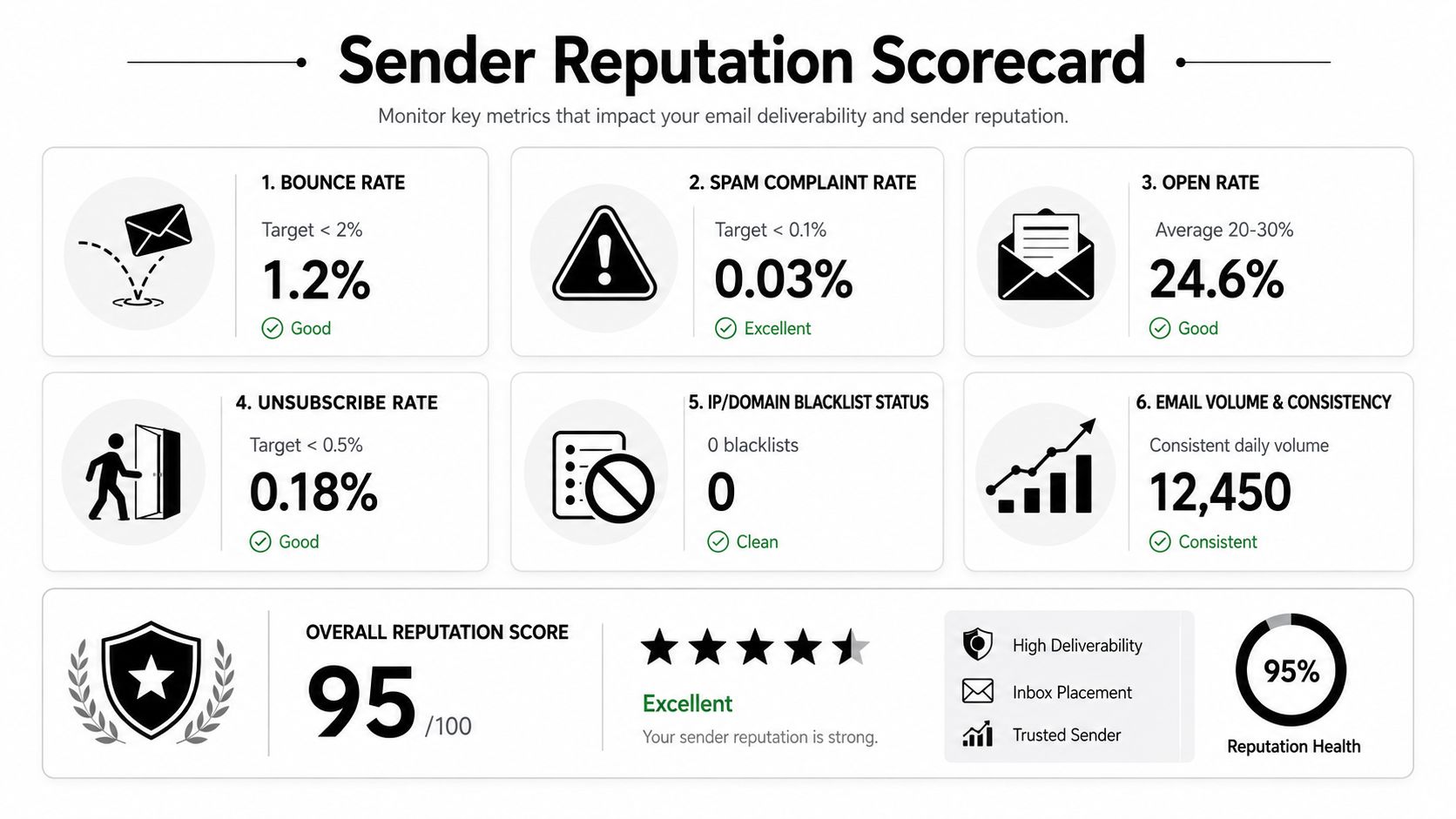
What they're judging is the sender behind the message, not the message. Consistency of sending, because sudden spikes create suspicion faster than steady volume. Audience quality, because permission-based subscribers behave nothing like a purchased or scraped set. Complaint behavior, which is where a technically clean sender can still look risky. Engagement concentration, because if only a thin slice of your list interacts, that says something about the rest of the database. And separation of mail streams, since transactional and promotional traffic shouldn't share a risk profile.
If you want visibility into how providers see you rather than how your ESP sees you, start with our Google Postmaster Tools guide and watch spam complaint rate as its own number.
Repair works best when you stop trying to push through the problem.
| Action | Why it helps | What teams get wrong |
|---|---|---|
| Slow down risky sends | Reduces new negative signals | Continuing full-volume blasts |
| Mail the most engaged users first | Gives providers stronger trust cues | Sending reactivation mail too early |
| Split transactional from promotional traffic | Protects critical mail paths | Mixing all traffic under one stream |
| Remove low-intent and chronically inactive contacts | Improves signal quality | Keeping everyone "just in case" |
| Keep volume stable during recovery | Rebuilds predictability | Making erratic send decisions |
Blacklist checks are useful but they're not the story. Teams fixate on blacklist status because it feels concrete and binary; in practice a sender can be absent from every public list and still have weak placement because one major provider has quietly stopped trusting the domain.
Reputation repair is usually subtraction, not addition. Fewer sends to better recipients beats more sends with better copy.
If your team is under revenue pressure during a cleanup, protect lifecycle and transactional mail first. Promotions can recover later; password resets, receipts, trial onboarding, and account alerts cannot wait behind a project.
The link between engagement and inbox placement
This is the part teams resist, because they want deliverability to be a technical checklist. Checklists feel controllable. Set the records, verify the domain, warm the infrastructure, move on. But some of the worst deliverability problems start after all of that is already correct.
Mailbox providers observe behavior at scale, and they can tell the difference between mail that is wanted and mail that is merely valid. A sender can have proper authentication, no template issues, clean rendering, and consistent branding, and still get filtered because recipients aren't signaling interest. If enough people ignore, delete, or complain, the provider has no reason to keep trusting your next campaign.
That's why big lists often underperform smaller ones. The larger list carries more dead weight and more addresses that stopped being real people years ago; the smaller one sends a cleaner signal.
You don't fix that by sending harder. Run re-engagement before suppression, giving inactive subscribers one clear chance to stay. Segment by behavior rather than demographics, because buyers, browsers, trial users, and dormant contacts should not receive identical mail. Match cadence to intent, since daily mail to high-intent buyers can work while daily mail to cold leads will wreck a domain. Make unsubscribing easy, because trapping unhappy recipients converts them into complaints. And trim the vanity segments; a master list is usually where the weakest subscribers hide.
Better engagement doesn't start in the inbox. It starts at signup, targeting, and expectation setting.
One uncomfortable point to end on. Mailing unengaged subscribers because they might convert eventually is the exact behavior that causes the next deliverability loss. A smaller list with clear intent beats a bloated database every time, and the finance argument for keeping the bloat has never once survived contact with a Gmail reputation drop.
Preventive maintenance
Most deliverability disasters aren't sudden. Teams get warning signs and ignore them because campaigns are shipping, targets are tight, and nobody owns sender health directly.
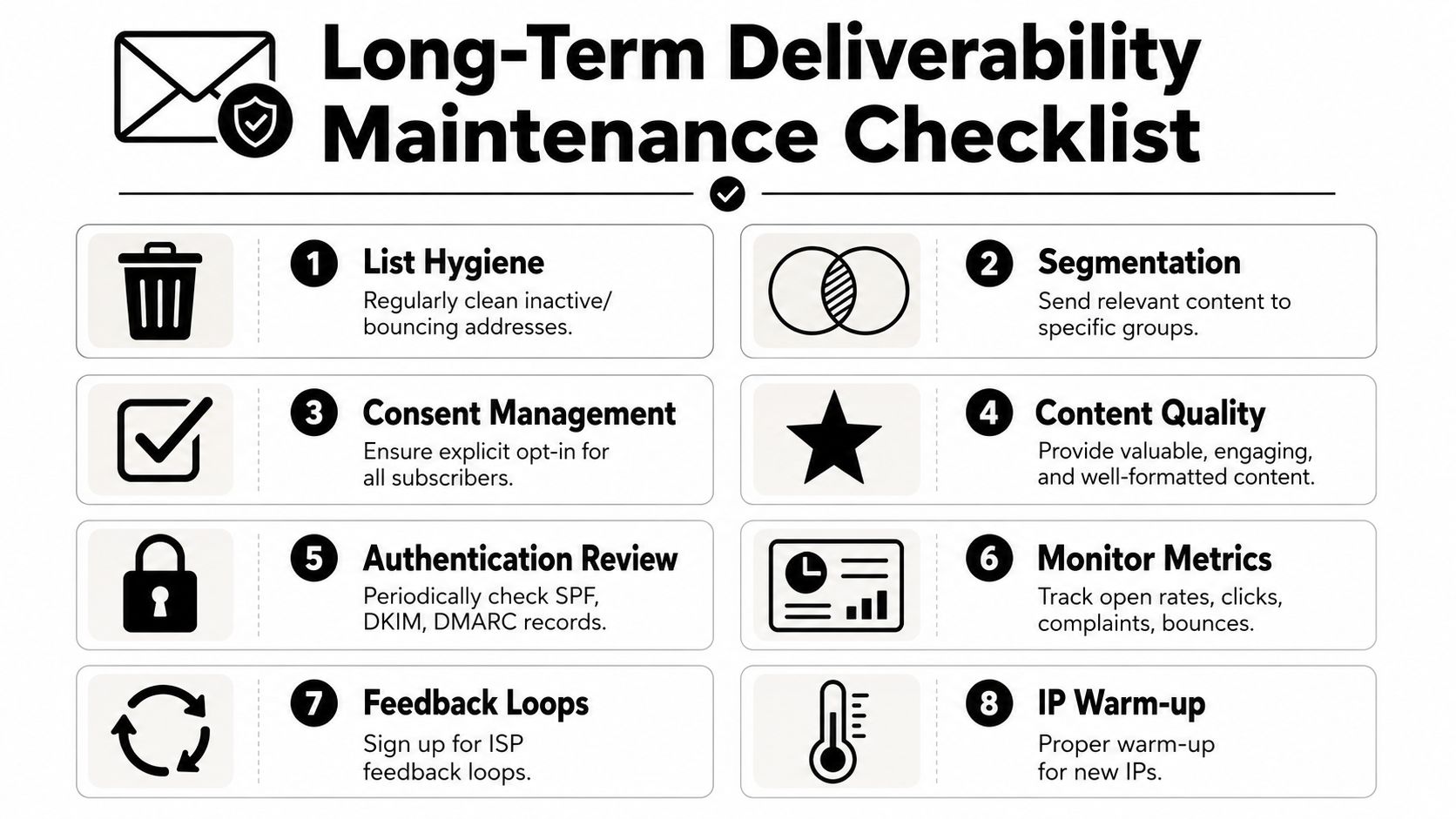
Prevention needs a rhythm rather than a heroic cleanup every few quarters.
Weekly, review performance by provider and look for shifts across Gmail, Outlook, Yahoo, and business domains. Check complaint and unsubscribe rate patterns rather than totals, watching for spikes tied to one campaign or one source. Scan recent list growth sources, since new lead channels introduce poor-fit contacts before anyone notices.
Monthly, audit authentication and the full list of sending systems, because new tools appear without announcement. Review inactive segments and decide who gets re-engagement, who gets suppressed, and who should never be mailed again. Test inbox placement rate on your key streams, especially onboarding and receipts.
Quarterly, revisit domain and stream structure, separating high-risk from high-value mail if the volume justifies it. Review acquisition quality, because the list source matters as much as the message. Update warm-up and ramp rules, since new domains need discipline rather than improvisation.
The plan should also match the business model, and this is where generic advice stops being useful.
For ecommerce brands, promotional aggression is the risk. Sales pushes work, but only when the list is segmented tightly and transactional mail is walled off; don't let discount campaigns contaminate order confirmations.
For SaaS teams, onboarding matters more than batch volume. If trial users miss activation emails, you have a revenue problem wearing a deliverability costume, and it needs to be tracked separately from newsletters.
For agencies, the risk is inconsistency across clients. One client has clean acquisition and steady cadence; the next imports old leads, changes sending domains, and demands volume. Standardize the audit across every account so weak practices don't hide behind strong performers.
For newsletter publishers, the danger is slow drift. Readers rarely complain; they just stop caring, and the mailbox provider notices before you do.
The long-term win is a program that earns trust repeatedly instead of squeezing performance out of a declining audience. Our email deliverability guide is the broader reference if you want the full setup checklist, and Mailneo keeps sending, deliverability tooling, and monitoring in one place if you'd rather not stitch together a stack to do it.
Explore: Email Deliverability
Related Articles
10 Email Deliverability Best Practices for 2026
Better email deliverability in 2026 depends on authentication, clean subscriber data, sender reputation monitoring, consistent sending patterns, complaint management, and client testing. This checklist walks through the ten practices that help more legitimate campaigns reach the inbox.
Email deliverability: the complete guide for 2026
Email deliverability is the rate at which your emails actually reach the inbox instead of the spam folder or a bounce log. This guide walks through the authentication, reputation, engagement, and monitoring levers that decide whether your next campaign gets opened.
SPF vs DKIM vs DMARC: Email Authentication Explained
SPF, DKIM, and DMARC are three DNS-based email authentication standards that together verify senders, protect message integrity, and tell inbox providers what to do with spoofed mail. Skip any one of them and your deliverability suffers.
How to avoid the spam folder: 15 proven tips
To avoid the spam folder, authenticate with SPF, DKIM, and DMARC; send from a custom domain with a clean list; keep content balanced; warm up new senders; and monitor reputation through Google Postmaster Tools. Small mistakes (like a noisy subject line or a stale list) push good campaigns into spam.
Ready to supercharge your email marketing?
Start sending smarter emails with AI-powered campaigns. No credit card required.
Get Started Free