Email Plain Text vs HTML: The 2026 Decision Guide
Plain text and HTML email each work in different contexts. This guide compares deliverability, engagement, tracking, accessibility, branding, and AI spam-filter behavior so teams can choose the right format for each campaign.

The old rule said plain text is safer and HTML is riskier. That rule no longer holds across every sending context. For relationship email it still mostly does; for cold outreach, filtering has changed enough that a completely unformatted message can read as low-effort bulk mail rather than a personal note.
Most advice on this question treats format as a timeless best practice. It's a context-dependent decision. The right answer depends on who you're emailing, what action you want, how much trust already exists, and whether the message needs to look personal, branded, or operational.
Why the format choice still matters
Email format shapes more than appearance. It changes how mailbox providers classify the message, how recipients read your intent, how your analytics work, and how much trust the message carries before anyone reads a line.
That matters more now because inboxes aren't sorted by simple rule-based filters alone. Providers look for patterns that suggest legitimacy, consistency, and expected behavior. A message too polished for a personal follow-up reads as promotional; a message too bare for a business introduction reads as suspicious.
Practical rule: choose format based on the job the email has to do, not on ideology about cleaner or safer email.
The debate also isn't settled by saying HTML is for newsletters and plain text is for personal notes. A founder update to existing users often performs better as plain text because it reads like a direct message. A cold outreach email to a business contact often performs better as minimalist HTML, because basic branding and structure signal that a real company sent it.
Three risks sit underneath the choice. The wrong format creates avoidable friction with spam filtering. A visually heavy message suppresses action where directness would have worked. And a raw email can look careless in contexts where recipients expect proof of legitimacy.
Small and midsize teams feel this first, because they have no margin for wasted sends. If you're in SaaS, e-commerce, or agency work, the format decision touches onboarding, lifecycle email, promotions, outreach, renewals, and client communication. It's an operating decision that happens to look like a design preference.
What actually gets sent
Plain text and HTML get discussed as though they were separate campaign types. Technically, most modern emails contain both.
A multipart MIME email is one package holding multiple versions of the same message; one envelope, two copies inside. The recipient's email client picks which one to display.
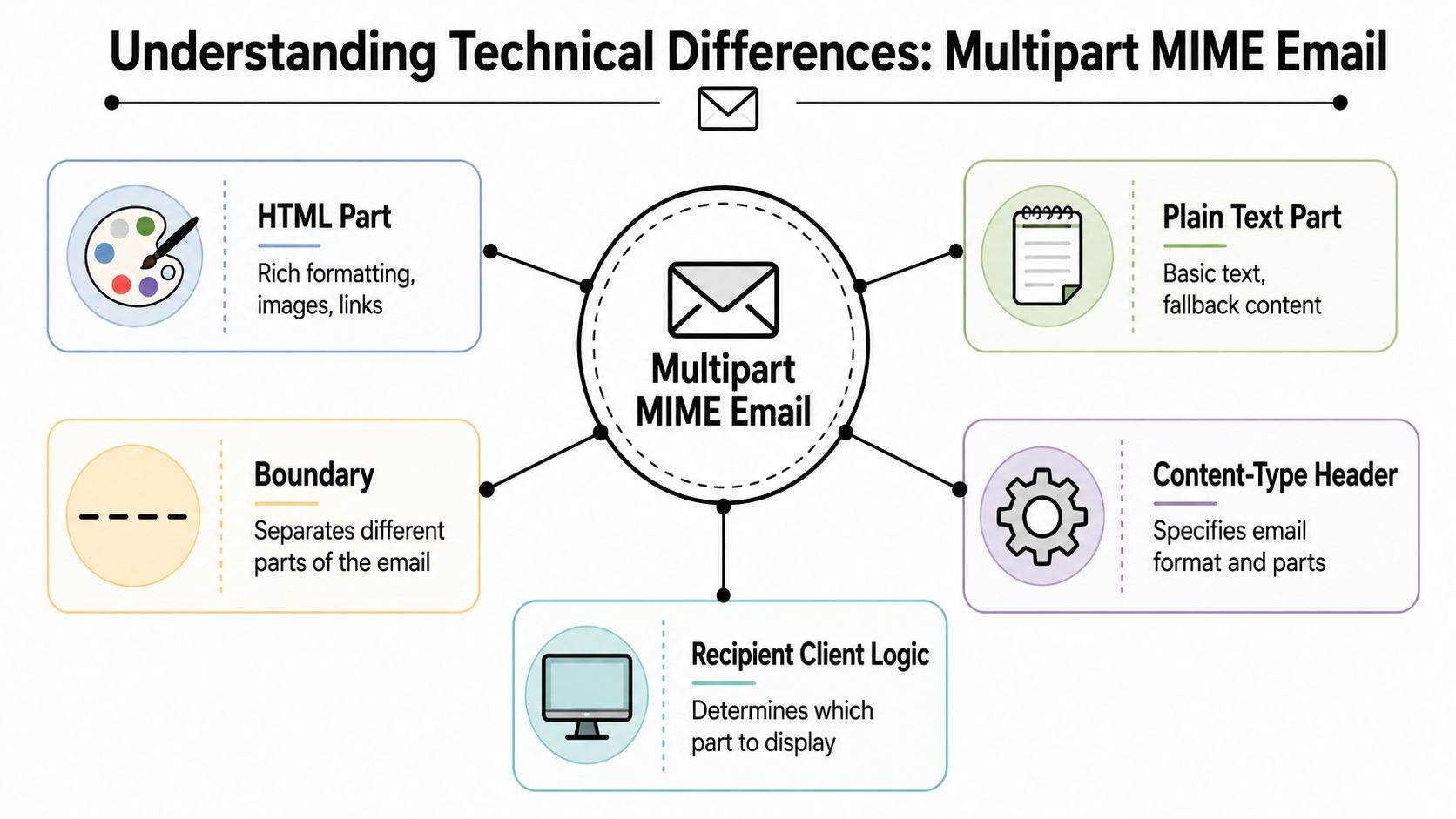
The parts are simple. The HTML part carries styled text, links, images, buttons, and layout. The plain text part carries the readable fallback with no styling. Boundary markers tell the receiving system where one part ends. Content-type headers tell the client how to interpret each one.
If you've ever built a campaign in an email platform, there's a good chance the platform generated the text version for you. That's why "HTML vs plain text" is misleading shorthand. In most real sends, the question isn't whether you included text; it's whether the HTML version is doing all of the communication work.
This has two practical consequences. If the plain text fallback is sloppy, link-stuffed, or machine-generated, some recipients and some filtering systems get a worse experience than you designed. And an email that looks plain inside a visual builder is often still HTML underneath, which changes how it tracks, renders, and filters. Don't confuse "looks like plain text" with "is plain text"; the underlying format is what systems evaluate.
For the structural side of building the HTML version properly, the guide to HTML email basics and examples covers the building blocks.
Comparing the two on business outcomes
Format affects four things that matter in almost every program: inbox placement, response behavior, usability, and brand control.
| Metric | Plain text | HTML |
|---|---|---|
| Deliverability | Strong for trusted, direct communication. Can look low-effort in some cold outreach contexts. | Strong when code is clean and layout is light. Risk rises with heavy design and clutter. |
| Engagement and tracking | Feels personal. Limited visual guidance. | Better structure for links, buttons, and tracked interactions. |
| Accessibility | Naturally simple to read across clients and assistive tools. | Can be accessible, but only if coded carefully. |
| Design and branding | Minimal visual control. Message carries the weight. | Full control over visual hierarchy, logos, and layout. |
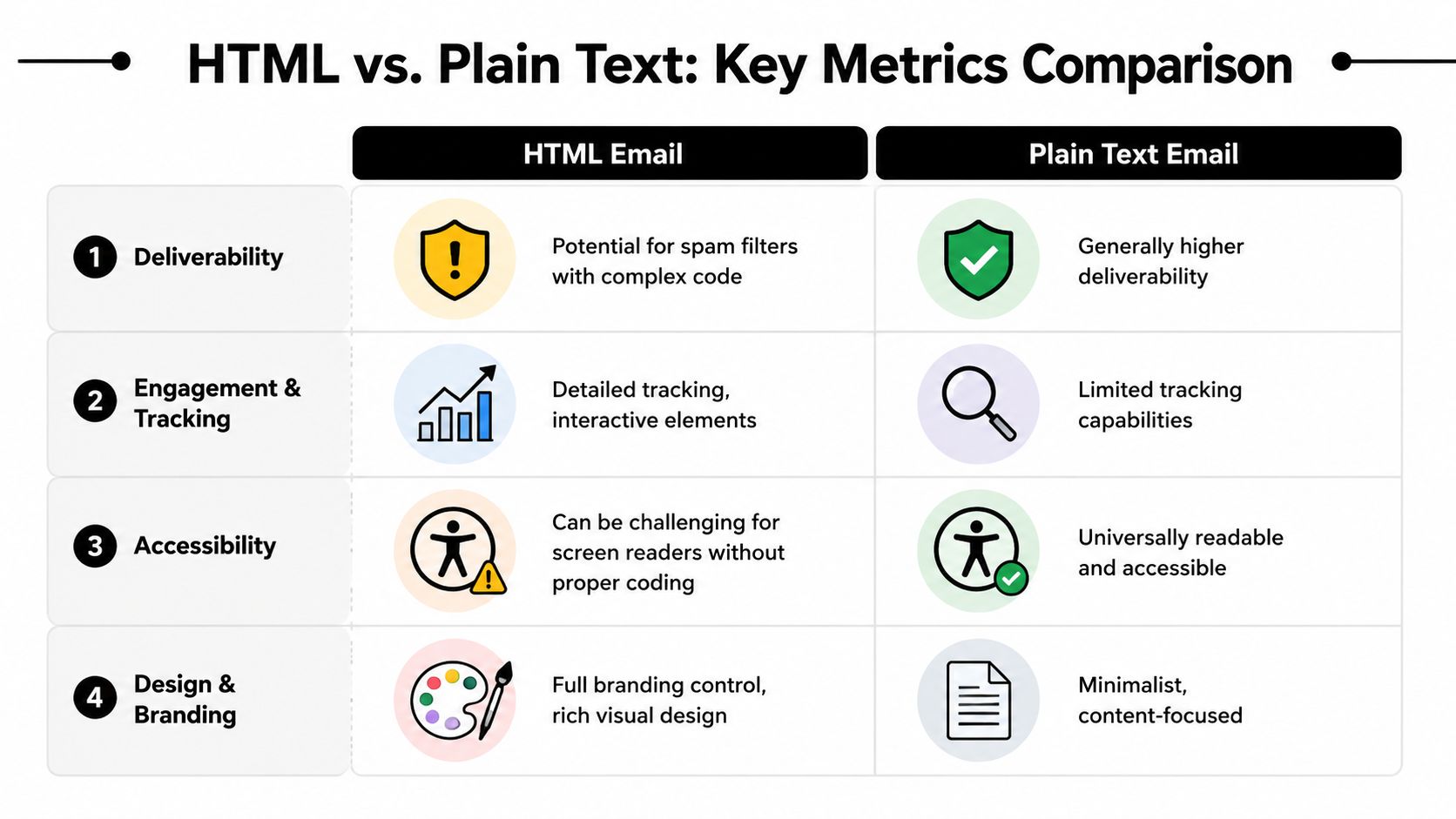
Deliverability
Plain text earned its reputation by removing failure points. No broken image calls, no messy code blocks, no over-designed template that announces mass promotion on sight. That simplicity still helps across lifecycle and relationship email.
But "plain text delivers better" is too broad to trust on its own. Mailbox providers don't evaluate format in isolation; they evaluate how the message fits the sender, the audience, and the expected behavior. A plain text renewal reminder from a company the recipient already pays feels normal. A stripped-down prospecting email from an unknown sender feels like disguised bulk outreach.
HTML introduces more variables and therefore more room for mistakes. Bad markup, too many visual elements, and weak fallback text all work against you. Clean HTML and bloated HTML are different products; the difference is operational discipline. If inbox placement is already unstable, format is a small lever compared with authentication and list quality, both of which the email deliverability guide covers properly.
Engagement and tracking
Plain text doesn't automatically mean lower performance, and for audiences that already trust you it frequently means the opposite. Existing customers need relevance and clarity more than visual persuasion; a plain text email reads like a note from a person rather than a campaign, and that changes how it gets treated.
HTML keeps one durable advantage: structure. Buttons are easier to spot than naked links, sections are easier to scan, and tracking is more robust because the format supports standard instrumentation. If you're comparing formats, judge them on click-to-open rate and reply rate rather than opens, since open tracking behaves differently across the two.
If the reader already trusts you, reducing visual friction can improve action. If the reader needs context fast, structure matters more than intimacy.
Accessibility
Plain text is naturally resilient. It doesn't depend on rendering quality, CSS support, or image loading, and it survives slow connections, older devices, and stripped-down clients.
HTML can be equally accessible, but only when the sender treats accessibility as part of production: logical reading order, usable contrast, meaningful link text, sensible image handling. Plenty of brands skip those details, and the result looks polished to one audience and broken to another. Run designed templates through the email accessibility checker before they go into a live flow. If you don't have a process for producing careful HTML, plain text is the lower-risk default.
Design and branding
This is the one category where HTML clearly wins. If product imagery, visual hierarchy, pricing blocks, or branded navigation carry the message, plain text won't substitute. E-commerce teams know this instantly, and so do agencies presenting creative and SaaS teams explaining a feature visually.
Branding also becomes noise. A lot of marketing email is over-designed for messages that would land better if they looked more direct. Format should follow intent: plain text when the message should feel like one person reaching another, full HTML when it needs visual explanation or scanning support, and light HTML when you need legitimacy without the weight of a promotional template.
That third category is the one most teams underuse.
Where minimalist HTML now wins
The biggest change in this debate is how filtering systems judge legitimacy.
Older advice assumed plain text carried less risk because it offered fewer technical signals to inspect. That held when filtering leaned on obvious formatting patterns and crude promotional triggers. Modern systems try to infer intent instead. They ask whether a message resembles expected communication from a credible sender, which means extremely bare outreach creates a new failure mode: it can look like low-effort bulk mail rather than authentic correspondence.

The old safety margin for plain text has narrowed, and for cold outreach I'd argue it has reversed. The sweet spot there is minimalist HTML: a simple business email with light structure, clear spacing, one image if it earns its place, and one primary action. No banners, no columns, no three competing offers.
That format sends balanced signals. It looks intentional, so the sender appears organized rather than disposable. It supports trust, because brand cues reassure a recipient who has never heard from you. And it avoids the visual excess that marks a message as promotional before anyone reads the first line.
If cold outreach is where you're applying this, the cold outreach swipe file shows the light-structure pattern in finished emails, and B2B cold subject lines covers the half of the problem that happens before the format matters. Format won't rescue a message that lands in spam for other reasons; the overview of how to avoid the spam folder handles that layer.
The useful question isn't whether plain text is safer. It's whether this format looks legitimate for this sender, this audience, and this kind of message.
Choosing by business moment
Format choice gets easier when you stop asking which one is better and start asking which one fits the moment.
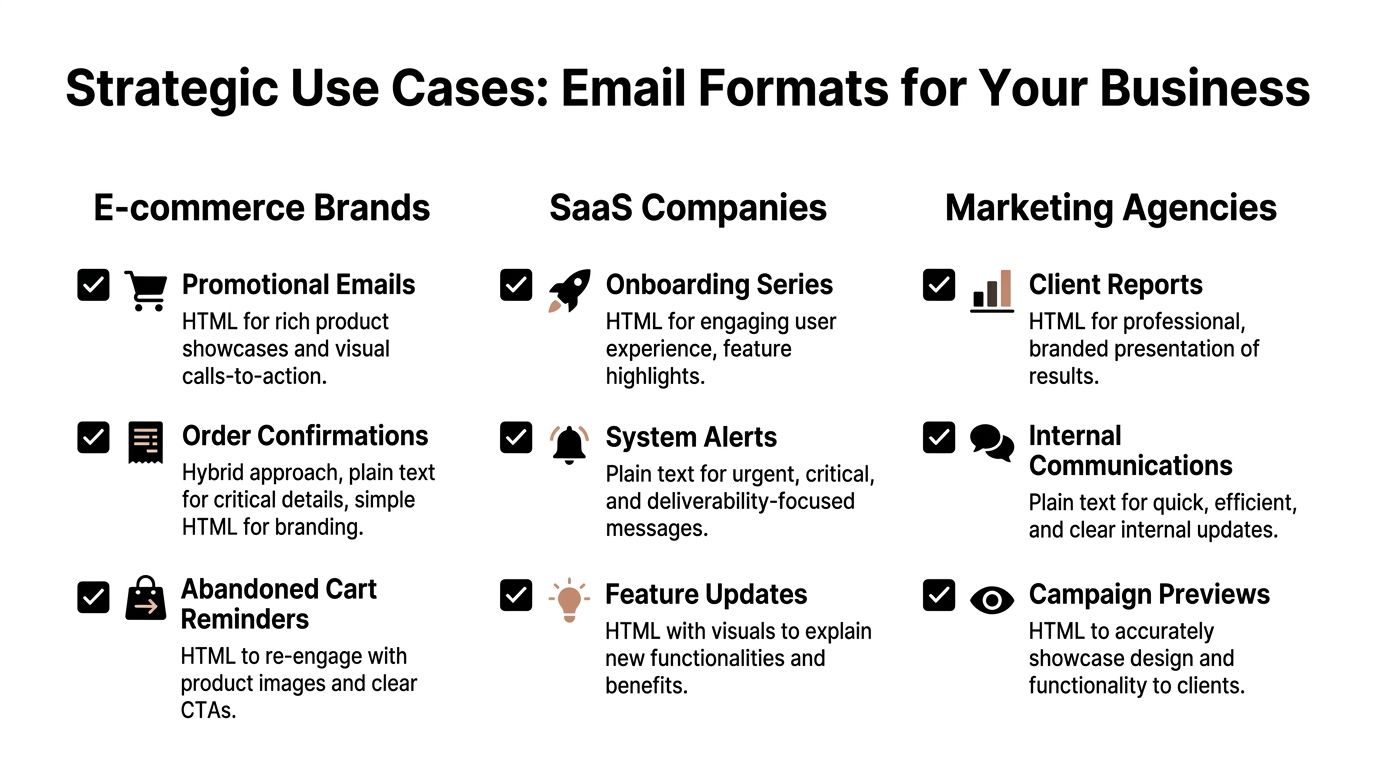
For an online store, HTML carries the revenue-heavy sends. Product launches, seasonal promotions, and category roundups depend on visual merchandising; customers need to see the product rather than imagine it from a line of text. Order and account updates should stay restrained so the information is findable, and recovery emails are worth testing both ways, since a message closer to a personal reminder than a storefront display often does better with less design. The e-commerce lifecycle flows show where each format tends to land in a full program.
SaaS teams need all three modes.
| SaaS email type | Better format | Why |
|---|---|---|
| Founder or CSM follow-up | Plain text | Builds one-to-one tone |
| Onboarding and activation | Light HTML | Adds clarity without looking over-produced |
| Product announcements | HTML | Visual explanation supports adoption |
| Incident or urgent alert | Plain text or very light HTML | Readability matters more than style |
The mistake most SaaS teams make is defaulting to the product marketing template for every touchpoint. Users don't experience every email the same way; the closer a message sits to a conversation, the less design it needs.
Agencies have a split personality here. Client updates work well in plain text because the feedback loop is fast and the relationship already exists. Outbound prospecting usually needs minimalist HTML, since new contacts want immediate proof that a real firm is reaching out. Performance reports and creative reviews need full HTML, because layout genuinely improves comprehension. The useful habit is matching format to stakeholder expectation rather than to house style.
Testing format without fooling yourself
Testing in this area usually falls apart at the setup. Teams change format, copy, subject line, CTA, and send timing at once, then declare a winner. That tells you two different emails performed differently; it tells you nothing about format.
Pick one primary metric tied to the actual job of the email. If it exists to generate replies, judge replies. If it exists to drive signups, judge signups. If it exists to recover carts, judge recoveries. Secondary metrics explain the result; they don't overrule the business goal.
Then keep the variable isolated. Same offer, same audience segment, same send window, same core copy. Change the format only.
- Build two versions: one true plain text or plain-text-style email, one light or full HTML version.
- Split the audience randomly, unless segment comparison is the actual purpose of the test.
- Wait for complete behavior before calling it. The mechanics are in the guide to A/B testing emails, and the A/B test calculator will tell you whether your sample can support the conclusion you want to draw.
Read the result by audience. The most valuable outcome is usually segment-specific: existing customers preferring direct plain text, new leads responding to structured HTML, one industry reading minimalist design as professionalism while another reads it as promotional. Whichever version wins, check it on a phone before it ships; overbuilt HTML with too many elements competing for a small screen is a bigger mobile risk than HTML itself, and the responsive email tester catches most of it.
Test format inside the audience relationship, not above it. Trust level changes how the same email is read.
That's how a format debate turns into an operating rule.
Explore: Email Design & Content
Related Articles
HTML Email Basics: Examples, Structure, and Testing
HTML email is an email built with markup, inline styles, and layout patterns that email clients can render. It is not the same as a web page. Tables, fallbacks, accessibility, image handling, and client testing matter more than modern CSS tricks.
Mailto Link HTML Guide: Syntax, Examples, and Pitfalls
A mailto link opens the user's email client with a prefilled recipient, subject, body, cc, or bcc field. It is useful for simple contact actions, but it is not a form replacement. This guide shows the exact HTML syntax, encoding rules, and mistakes to avoid.
AMP for Email: What It Is and How to Use It
AMP for email turns a static message into an interactive web app inside the inbox, letting subscribers submit forms, browse carousels, and update data without leaving Gmail. Support is limited to Gmail, Yahoo, and Mail.ru, so fallback HTML still matters.
Best Fonts for Emails: Practical Guide for Marketers
The best fonts for emails are readable, widely supported, brand-appropriate, and tested across inboxes. Use safe font stacks first, size body copy at 16px or more, reserve custom fonts for supported clients, and validate accessibility before sending campaigns.
Ready to supercharge your email marketing?
Start sending smarter emails with AI-powered campaigns. No credit card required.
Get Started Free